
Blackberry Thumb: The New High Tech Hand Disease
John Edwards a local supervisor for a medical equipment company bought himself a BlackBerry in February so he could instantly read and reply 24/7 to all the e-mails he was receiving from his local salespeople.
Edwards twists and torques his wrists and curls his fingers to clutch the 4.69-inch handheld device while scrunching his thumbs to type over 100 e-mails a day on the keyboard's popcorn kernel-size buttons.
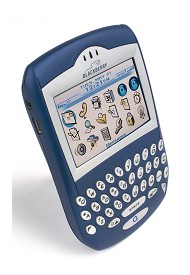
"My fingers cramp up, the area between her thumb and wrist begins to throb, my hands hurt, and I have problems grasping things," Edwards says. Sometimes "it will hurt all the way up to my neck."
Orthopedists say they are seeing an increasing number of patients with similar symptoms, a condition known as "overuse syndrome" or "BlackBerry thumb."
BlackBerry thumb has become a trendy new health condition that's sweeping the nation.
While there are presently 2.5 million Americans are BlackBerry subscribers, up from around 1 million last year, there's hardly an epidemic of BlackBerry-induced injuries.
However, typing on these little electronic devices can take a toll on tendons because it requires forceful micromovements from hand muscles.
The miniature keypad leaves little room to use the stronger shoulder muscles, which would alleviate some strain.
As the sizes and prices of handheld typing devices continue to shrink, doctors and therapists caution that consumers need to treat their on-the-go text messaging work as a physical workout.
The endurance runs out in the smaller muscles faster and when those muscles grow exhausted, the body compensates by tightening the tendons, which connect muscles to bones.
The three most common conditions associated with this new condition are:
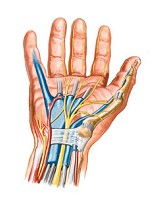
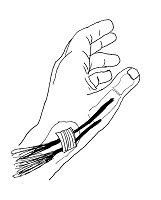
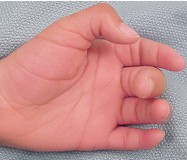
How to Prevent Hand Pain
The American Society of Hand Therapists has recommended preventive measures, such as spreading the fingers as far as possible for 10 seconds and switching which hands and fingers do the taxing work.
As with most sports, it's important to warm up and cool down by stretching.
TYPING TECHNIQUES
Dr. Norman Kahan, a physical medicine and rehabilitation specialist in Cupertino, Calif., has developed ways to ease the strain.
THE DROP
Instead of keeping your arms still while forcing your wrists and fingers to stretch and strain to reach buttons scattered across the keyboard, start swinging your arms and take advantage of momentum. Use your elbow as a hinge that lifts your arm and softly drops it so the fingers hit the targeted keys, with the help of gravity.
THE ROLL
Rapidly type several letters with little effort by rolling your fingers over adjacent keys. It's like playing a piano chord, but you're hitting keys successively instead of simultaneously.
To type the word "power," gently rock your right hand from right to left over the letters "p" and "o"; then rotate your left hand from left to right so the fingers roll over the letters "w," "e" and "r."
THE GLIDE
Gripping and maneuvering the computer mouse with the thumb and pinkie can strain your tendons. Instead, rest the entire palm on the mouse so the hand has a place to rest while the arm and shoulder provide the pushing power. Move the mouse in circular motions, like an ice skater carving figure eights.